
A good Toca Boca house starts with what happens inside it. A sleepover needs places to sit and leave bags. A family breakfast needs a table, a kitchen and room for everyone to gather. Decide on that little moment before choosing every decoration.
Home Designer gives you a house to arrange. Furniture and small objects give that house its personality. This guide connects the two, with a compact apartment idea you can adapt to the items in your game.
A house and a location are different things
A school, a shop or a skatepark is a place to visit. A Home Designer house is a space you build and decorate. The two can belong to the same story, but they are different parts of the world.
For a house, begin in Home Designer. To plan where your characters go after leaving home, use the locations guide. Keep the cast the same and the world will feel connected.
Choose your starting room
The Style Selector offers two starting points when you build a supported house: Ready to Play for a furnished beginning, or Ready to Decorate for an empty space. A preset can help you start quickly; an empty house gives you more room to plan the layout yourself.
In Home Designer, use the blue hammer, choose a house and then choose its starting style before building. The options and furniture depend on the house and game version. See the publisher’s Style Selector explanation for that feature’s instructions.
If you already have a decorated house, keep a picture of the arrangement before experimenting. A screenshot is a useful design reference; it does not back up your game’s saved world.
Try this: one room, three small zones
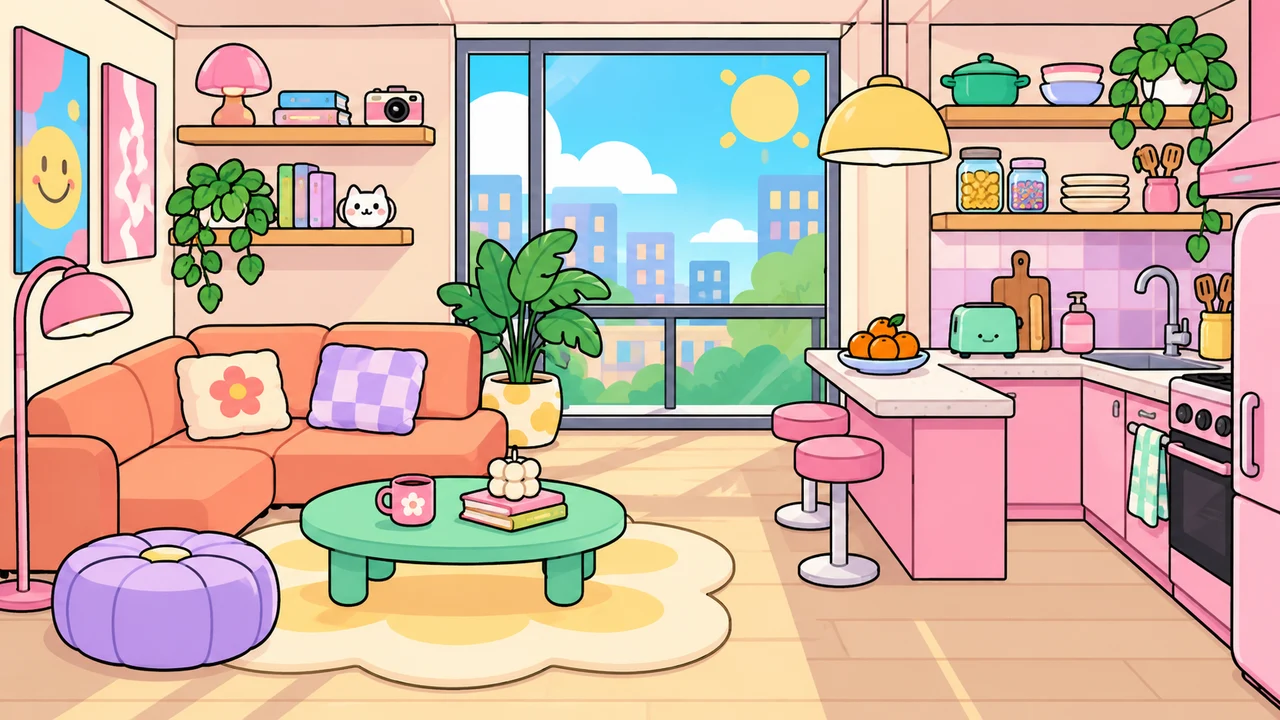
The illustration above is a Bocamod room concept. It uses three connected areas instead of filling every wall with furniture. Treat its colors and layout as inspiration, then choose the actual pieces available in your game.
| Area | The main piece | What makes it work |
|---|---|---|
| A place to gather | A sofa beside a low table | The characters can face each other |
| A place to make food | A short kitchen counter | Keep the working area easy to reach |
| A place to move | Open space between the two | A visitor can enter without crossing the table |
Start with those larger pieces. Bring a character into the room and imagine carrying breakfast from the kitchen to the sofa. If an object blocks that little journey, move it before adding more.
Make the furniture feel connected
Our room concept repeats peach, pink and mint. You can use another combination: choose one main color, a quieter background and one small accent. Repeat the accent in two or three places rather than putting a different color in every corner.
Mixing packs can work when the pieces share a color, shape or purpose. A simple table can connect brighter seating and decorations. The furniture guide explains how to build a small source list for your room.
Add the details that tell the story
A bag beside the sofa suggests someone just arrived. Two cups suggest a conversation. A book on a shelf can belong to the character who lives there. Give each detail a reason to stay.
Try a moving-day scene: one character brings a box, another decides where the lamp goes, and a visitor arrives before the room is finished. You can create the scene with only a few props. The house becomes useful before every space is decorated.
Keep the design easy to return to
Take one clear picture of the finished arrangement, then a closer picture of the corner you like most. Note the house and furniture packs you used. That helps when you want to make another room in the same style.
For the broader content categories, return to the Toca Boca All Unlocked overview. For device choices, use iPhone & iPad or Android. Named houses and packs depend on the release you use.